How to Track Which of Your LLCs Owns What (Without a Spreadsheet)
Learn how to record who owns each LLC, follow ownership through holding companies to your effective stake, and see where a spreadsheet stops working.
Last reviewed 3 min read
To track which LLC owns what, keep one record for every ownership stake: who the owner is (a person or another entity), which entity they own, what percentage, and as of when. Then follow those stakes up and down the structure to see what each person and each holding company owns indirectly.
Looking up who owns someone else’s LLC? That’s a different task: a search of the state’s public business records. This guide is for tracking the ownership of entities you own or manage.
What you’re actually tracking
Three things, and a spreadsheet tends to capture only the first:
- Direct ownership: who holds a stake in each entity, and how much. The owner can be an individual, a trust, or another company.
- Indirect ownership: what a person or holding company owns through the entities they own.
- Evidence and history: when a stake changed and which document supports it, such as an operating agreement, an assignment of interest, or a trust document.
A worked example: multiply down the chain
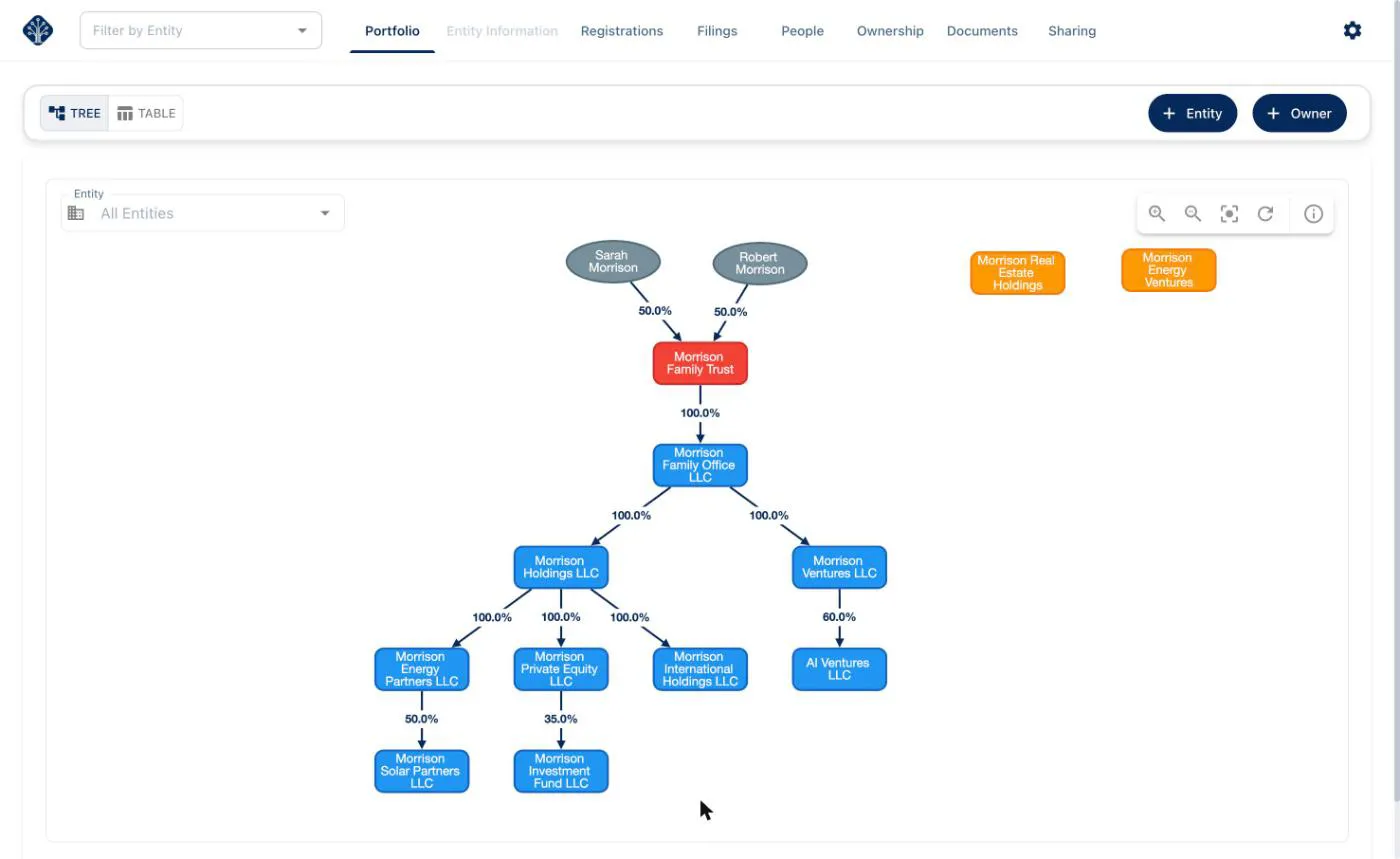
Say Sarah Morrison owns half of a family trust. The trust owns a family office LLC, which owns a ventures LLC, which owns 60% of a startup LLC.
| Link in the chain | Stake |
|---|---|
| Sarah Morrison → Morrison Family Trust | 50% |
| Morrison Family Trust → Morrison Family Office LLC | 100% |
| Morrison Family Office LLC → Morrison Ventures LLC | 100% |
| Morrison Ventures LLC → AI Ventures LLC | 60% |
Sarah’s indirect stake in AI Ventures LLC is the product of every link: 50% × 100% × 100% × 60% = 30%.
The names and numbers are sample data.
That’s her economic share by simple multiplication. Who has control, how income is taxed, and what counts as ownership for a particular legal or tax purpose can follow different rules, so your attorney and accountant decide those questions.
Where spreadsheets stop working
A spreadsheet works while the structure is small and rarely changes. It gets fragile as layers and entities are added:
- Every layer is another multiplication done by hand. Change one percentage upstream and every number below it is out of date.
- A transfer of interest means editing several rows. Miss one and the sheet quietly disagrees with reality.
- There’s no history. Overwritten cells can’t tell you what was true last year.
- Documents and deadlines live elsewhere. The sheet doesn’t know which agreement backs a stake or when an entity’s annual report is due.
- Sharing means sending copies. Your accountant’s version drifts from yours.
A record-keeping routine that holds up
- One record per stake: owner, owned entity, percentage, effective date, and the supporting document.
- Record what kind of owner it is: an individual, a trust, or a company, so the chain can be followed.
- Check that each entity’s stakes add up to what you expect (usually 100%).
- Update the record the day a change happens, not at year-end.
- Review the whole structure once a year, for example when you file annual reports.
- Keep the supporting documents with the records so a stake and its evidence never separate.
How Equipath handles it
In Equipath you add entities and their owners, individuals or other entities, with a percentage for each stake. The rest is calculated for you:
- The Portfolio view draws the structure as a tree, with the percentage on every link, or as a table.
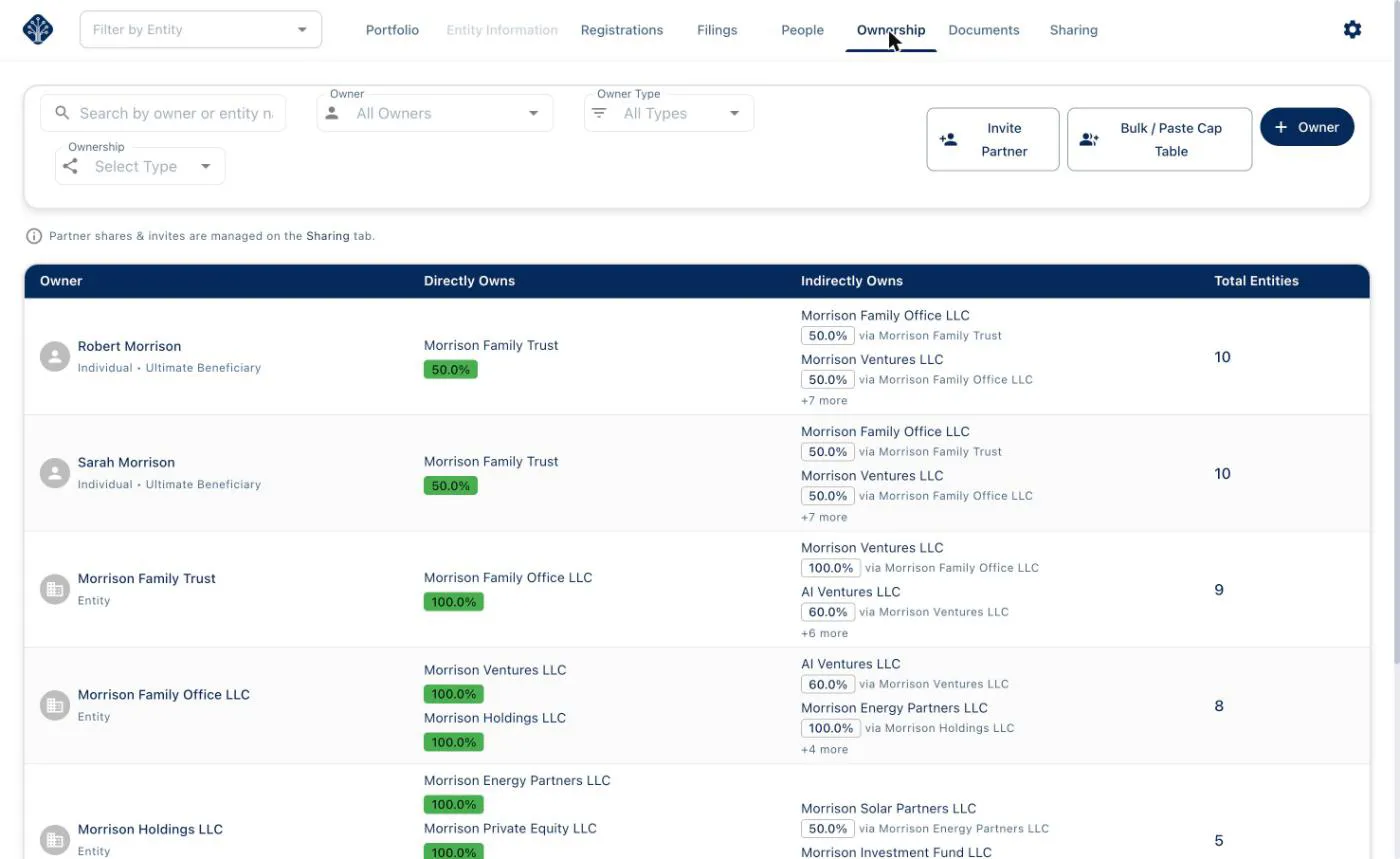
- The Ownership page lists every owner with their direct and indirect ownership, and shows which entity each indirect stake comes “via”. Indirect percentages are calculated by multiplying along the chain, as in the example above.
Sample data.
Ownership mapping is part of Equipath’s free core features. To set up a holding structure, see Modeling a multi-entity holding structure. If you also use QuickBooks for more than one LLC, our guide to what QuickBooks doesn’t track covers how to split the work between your books and your entity records.
This article is general information, not legal, tax or accounting advice. Requirements vary by jurisdiction and change over time — confirm the details for your situation with a qualified professional.