QuickBooks for Multiple LLCs: Classes, Separate Files, and What Neither Tracks
Compare QuickBooks classes and separate company files for multiple LLCs, plus what accounting software isn't built to track: deadlines, ownership, documents.
For business owners Last reviewed 4 min read
If you own more than one LLC, the cleanest QuickBooks Online setup is usually one company per LLC. Classes can tag transactions by segment inside a single company, but they don’t create separate books. Either way, QuickBooks records and reports your money. It doesn’t track the other half of running several LLCs: filing deadlines, who owns what, and where the paperwork lives.
Option 1: One QuickBooks company per LLC
Intuit lets you add more than one company to a single QuickBooks Online sign-in and switch between them without signing out. According to Intuit’s help article, this setup means:
- Separate books for each LLC. Each company’s data, including user access, bank connections, and customer and vendor lists, stays completely separate.
- A separate subscription for each company. Intuit states that each company you create requires its own paid subscription, so your costs grow with the number of LLCs.
- One sign-in. You switch between companies from the Settings menu.
This mirrors your legal structure: separate entities, separate books. The trade-off is cost and convenience. In the basic setup, each LLC’s reports stand on their own, so seeing everything at once means switching between companies.
Option 2: One company with classes
Classes are QuickBooks’s way to “track your transactions by departments, product lines, or any other meaningful segments,” in Intuit’s words. Class tracking is available in QuickBooks Online Plus and Advanced only, so it isn’t an option on the lower-tier plans.
One workaround is to use a class per LLC to see income and expenses by LLC inside a single set of books. It costs less, but it’s a reporting shortcut, not a legal one:
- Classes tag transactions inside one set of books. They don’t turn one company into several.
- Your LLCs remain separate legal entities. For federal tax purposes, the IRS treats a single-member LLC as disregarded from its owner for income tax by default, and a domestic LLC with at least two members as a partnership by default, unless the LLC elects to be taxed as a corporation. Even a disregarded single-member LLC is still considered a separate entity for employment tax and certain excise taxes.
- Those classifications can differ from one of your LLCs to the next, and they affect what each one reports and how.
That’s why “can I put all my LLCs in one QuickBooks file?” is really a question for your accountant, and possibly your attorney, who can tell you whether combining records affects the separation between your LLCs.
How to choose
Choose separate companies when:
- your LLCs have different owners or different tax classifications,
- each LLC has its own bank accounts and cards to reconcile, or
- an accountant or partner should see one LLC’s books but not another’s.
Consider classes only when:
- the LLCs are closely related and share the same owner,
- you’re already on Plus or Advanced, and
- your accountant has confirmed it’s appropriate for your tax setup.
When in doubt, default to separate companies and ask your accountant.
What QuickBooks isn’t built to track
Accounting software is built to record and report money. Running several LLCs involves records that sit outside that scope:
| The question | Where the answer usually ends up |
|---|---|
| When is each LLC’s annual report and franchise tax due, in each state? | A spreadsheet or calendar you maintain by hand |
| Who owns each LLC, and what does each holding company own? | A spreadsheet, a diagram, or one person’s memory |
| Where is each LLC’s operating agreement, and who can see it? | Email attachments and shared drives |
| Which advisor should see which entity’s records? | Invitations set up separately in each tool |
None of this is a flaw in QuickBooks. It’s simply not what accounting software is for. It’s the gap between your books and your legal entities.
A simple setup that covers both
- Keep the books in QuickBooks (or your accounting tool), set up the way your accountant recommends.
- List every entity in one place: legal name, entity type, state of formation, and tax classification.
- Record each state registration and its recurring filings, such as annual reports and franchise tax, on a single calendar.
- Map who owns what, including ownership through holding companies. Our guide to tracking which of your LLCs owns what walks through it.
- Keep each entity’s key documents together and share them by role instead of forwarding files.
Where Equipath fits
Equipath is entity management software, not accounting software, built for that second list. It shows your entities as a portfolio (a tree or a table), maps ownership percentages, and puts filing deadlines across every entity and jurisdiction on one compliance calendar. It works alongside QuickBooks rather than replacing it.
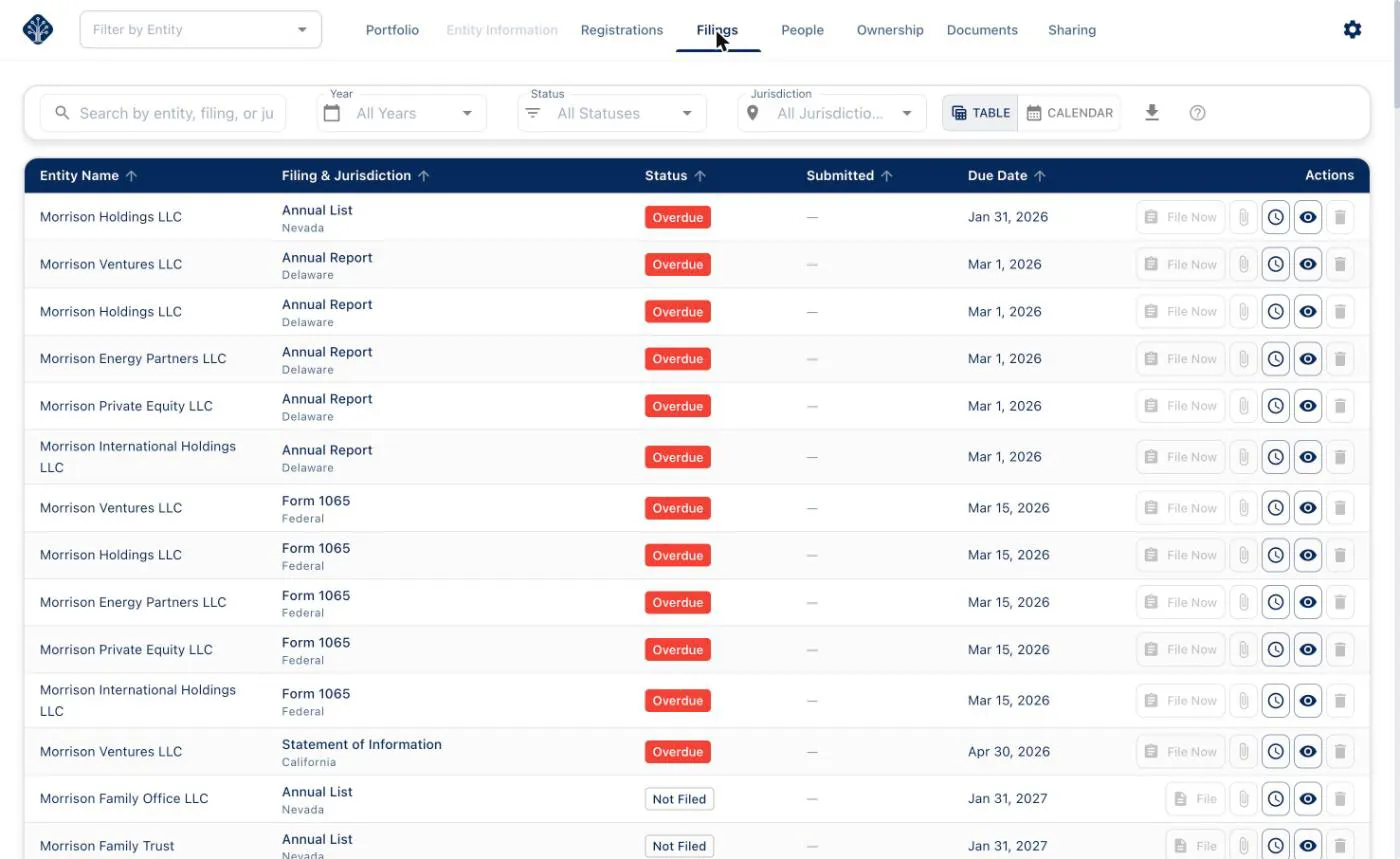
Sample data. The entities, filings and due dates shown are illustrative.
Core features, including entity organization, the compliance calendar and ownership mapping, are free. Document storage and sharing are part of Premium. To see how the calendar works, read Understanding the compliance calendar.
Frequently asked questions
Can I use one QuickBooks account for multiple LLCs? You can use one sign-in for multiple companies, but Intuit says each company needs its own paid subscription and keeps its own data.
Do classes work for multiple LLCs? Classes let you segment transactions inside one company, on the Plus and Advanced plans. They don’t create separate books, so ask your accountant whether that’s appropriate for your LLCs’ tax setup.
Does QuickBooks track LLC filing deadlines? State annual reports and franchise tax deadlines aren’t what accounting software is designed to manage, so you’ll want to track them separately, on a calendar, in a spreadsheet, or in entity management software like Equipath.
Sources
This article is general information, not legal, tax or accounting advice. Requirements vary by jurisdiction and change over time — confirm the details for your situation with a qualified professional.